ArcV2_DC — Digital Cubby
The at-a-glance board: a material by thickness work-order matrix with heatmap coloring, cubby classification, drill-down detail, and job-sheet printing with traceability watermarks.
What it does
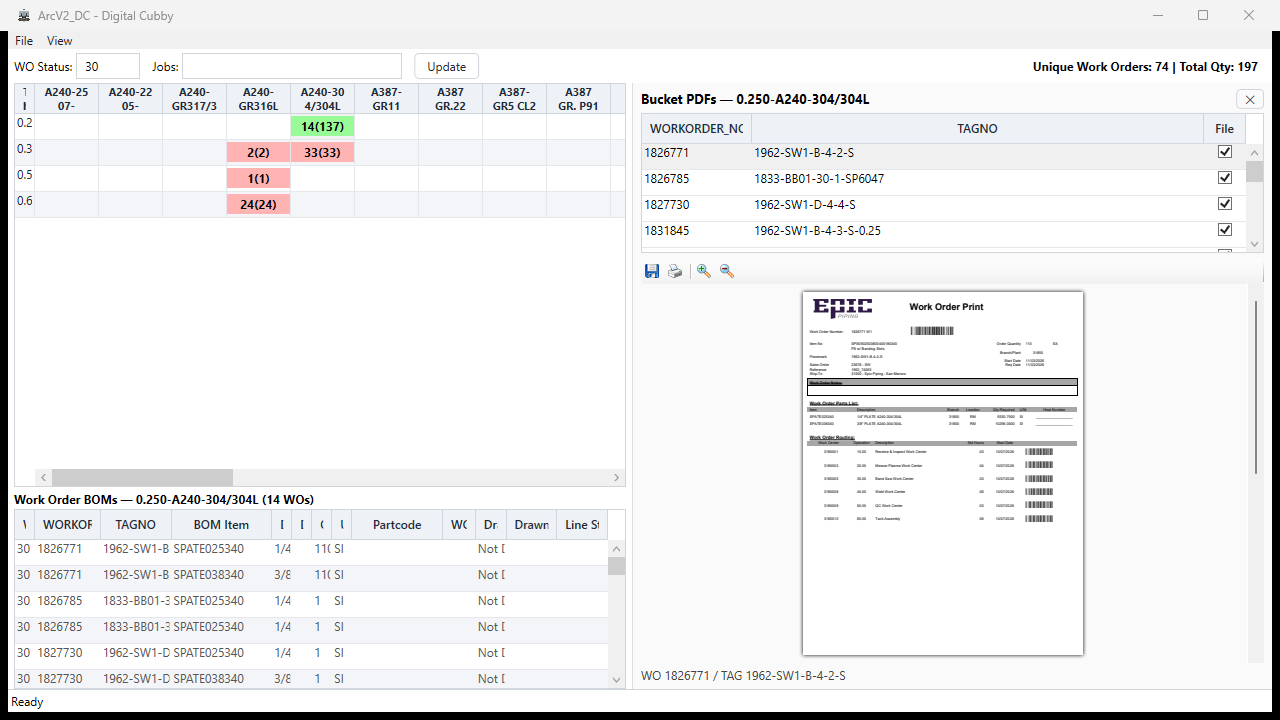
The Digital Cubby answers one question at a glance: what work orders exist for this material and thickness, and how loaded is each cell? Every cell in the matrix is a material × thickness intersection; the colour scale shows how many work orders sit in it.
Clicking a cell drills down into the bucket — the work-order BOMs behind it, the PDFs attached, and the job sheet ready to print with a traceability watermark.
The board
The right-hand pane shows the selected bucket's PDFs and a live preview of the job sheet that will print — including the traceability watermark that carries machine, WO/qty, and a Code39 barcode on page 2.
Printing
- Watermarked job sheets — page-2 strips carry machine traceability, WO/qty, and a Code39 barcode.
- Mandatory confirmation — a confirm dialog plus a re-print reason that cannot be skipped. Unconfirmed prints write nothing.
- Audit log — who printed what, when, and why they re-printed, in the shared
print_eventstable.
Everywhere else in the suite the system warns instead of blocking. The Digital Cubby is the exception: plate nesting and printing genuinely shouldn't happen twice, so this is the one flow that refuses to proceed without confirmation.
How it fits the suite
The matrix reads work-order and BOM-line state from the shared arcv2.db — status written by ArcV2_OT, classification from ArcV2_CC. It never writes workflow state back; it is a read-and-print surface over the same data the other two apps maintain.
Origin
The digital cubby was sketched on Bindr's roadmap as a future tab, then built as its own app when the suite consolidated. The ArcV2_System phase's design principle — warn, don't block, except where duplication is genuinely destructive — is why printing is the one gated flow here.
Next: full automation
The Digital Cubby currently ends at paper — it shows the work and prints the job sheet. The next step is combining this suite with AutoDXF2D and AutoDXFPro to close the loop from work order to nestable file.
Status arrives through ArcV2_OT, lines get classified by ArcV2_CC, and the board here makes it all visible. The missing tail: push a bucket straight into plate generation — mapped CSV in, dimensionally verified DXF / DWG / NC1 out — so a cell in the matrix becomes a nesting-ready file with no manual re-entry. Same data, same suite, one more step automated.