AutoDXF2D
Import or paste CSV data, map the columns through a gated workflow, assign plate shapes, and generate dimensionally accurate DXF, DWG, and NC1 files — all from the browser.
The problem
Shops receive parts as spreadsheets. The cutting machines need CAD. In between sits a human who has to read the CSV, work out what shape each part is, translate the dimensions into geometry, and produce a file the nesting software will accept — every single order.
AutoDXF2D makes that a guided web workflow. Import the data, tell it which columns mean what, assign a shape to each row, and it produces verified CAD files.
The workflow
- Import — upload a CSV, or paste raw CSV text, and see a parsed table preview.
- Map — name each column once: filename, length, width, thickness, material, and diameter. One at a time, gated, so you can't get ahead of yourself.
- Assign shapes — square, rectangle, circle, rounded square, or rounded rectangle, assigned across multiple rows at once or row by row.
- Edit radii — bulk or per-row corner-radius editing for the rounded shapes.
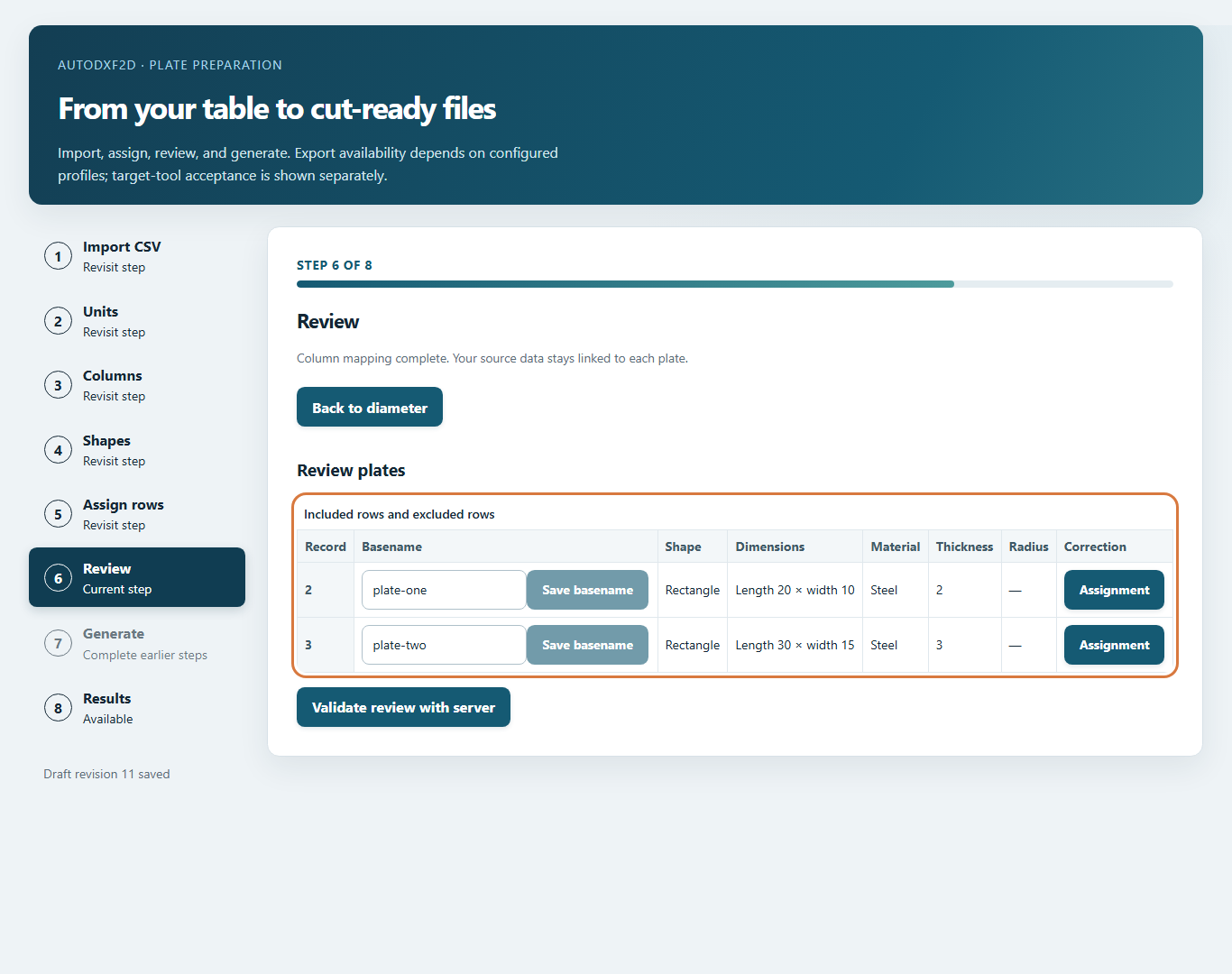
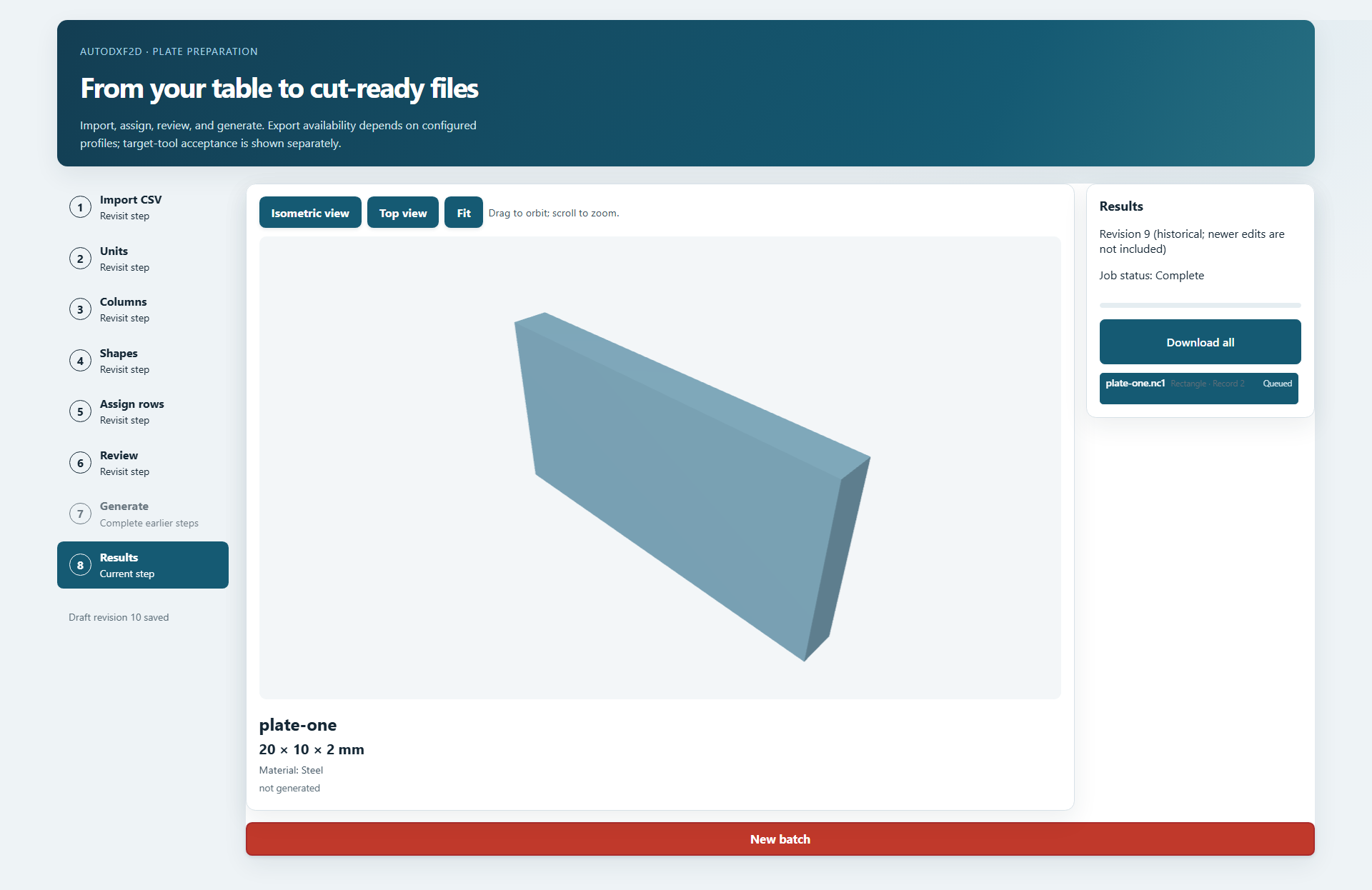
- Review — a right-hand results list beside a central 3D plate preview, so the geometry is visible before anything is exported.
- Generate — submit the frozen revision and download individual files or the whole batch as a ZIP.
Revisioned drafts, not loose files
Every edit happens against a revisioned draft. When you submit, the exact revision you reviewed is what gets generated — later edits to the draft don't retroactively change submitted geometry. Submissions are bound to that revision, and artifact downloads are scoped to it too.
Geometry freezing is the whole ballgame here. A shop that cuts a plate from stale geometry has scrapped material, so I made submitted revisions immutable rather than trusting the UI to stay in sync.
Three export formats
| Format | How it's produced and checked |
|---|---|
| DXF | Written by the canonical plate-geometry layer, targeting AC1015, then verified by reading the file back and checking the contours. |
| DWG | Written through ACadSharp and independently decoded with LibreDWG — the check is a separate reader, not the writer agreeing with itself. |
| NC1 | Written as DSTV seventh-edition B plates, then read back with an independent DSTV reader. |
I'm careful about what that proves. Those are technical capabilities, not compatibility approvals — an accurate contour and a file the target importer actually accepts are different requirements. The project keeps per-importer export profiles and refuses to claim support for profiles that haven't passed real downstream acceptance.
Background jobs that survive failure
Generation runs through a Dramatiq worker with leases, fencing, and bounded retries. If a worker dies mid-job — after writing a file but before recording it — another worker recovers the job and the artifact still downloads. There's a regression test that kills a worker at exactly that point to prove it.
Artifacts are only published once they're verified and fsynced, with checksums recorded. Retention is explicit: if you don't configure a positive retention window, submission is blocked rather than silently leaking files forever.
Private-team access and quotas
- Sign-in with an approved-user list. No public registration — though a shared demo account is published below so anyone can try the workflow.
- Standard accounts default to 100 parts per job and 20 jobs per UTC day.
- Service administrators are explicitly promoted and exempt from both quotas.
- An admin workspace manages accounts, limits, access, and password resets.
- Credential issuance is terminal-only: passwords are entered at a hidden prompt, never passed as command-line arguments, and only salted scrypt hashes are stored.
Deployment
The Railway preview runs the API and the worker in one supervised service with a durable artifact volume, plus separate private PostgreSQL and Redis services. That's a deliberately single-instance topology — moving to multiple replicas requires object storage, because Railway volumes aren't shared between services. The app also exposes /health/live and /health/ready probes, and Alembic migrations run on boot.
The live preview is up at autodxf2d-preview-preview.up.railway.app. It's a private-team app, so the sign-in gate is the first thing you'll meet — the workflow screenshots above are the tour.
Anyone is welcome to sign in and run the workflow end to end. Use the shared demo credentials below; no registration, no request needed.
Username: Free
Password: password1234
It's a shared account on a preview deployment, so treat it as a sandbox — the standard 100-parts-per-job and 20-jobs-per-day quotas apply, and anything you generate is visible to other visitors.
Engineering discipline
- An eight-phase implementation plan with explicit dependencies and a test gate on each phase.
- One GitHub issue per phase, with milestones as measurable goals.
- Issue-linked pull requests with passing CI; no phase closes until its exit gate passes.
- Root dependency pins with an exact supply-chain table published on a public security page.
- Local development via Docker Compose, with separate frontend (Playwright) and backend (pytest) validation paths.
This is the most process-heavy project on this site, and deliberately so — it's the one that writes files a machine will cut metal from.