MasterOCR
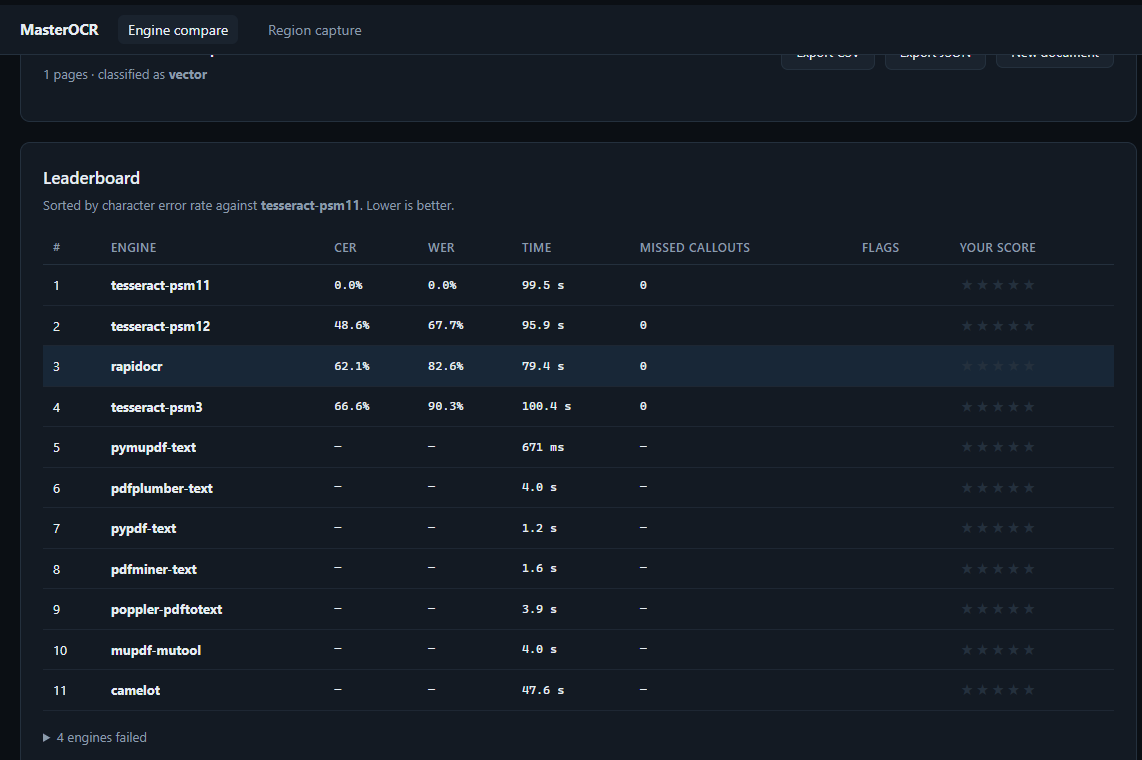
Upload a PDF isometric or schematic and MasterOCR fires it through 60 OCR engines, scoring character error rates, hallucination flags, missed dimension callouts, and your own star ratings.
The problem
Engineering drawings are a hostile input for OCR. They are mostly geometry, the text is scattered rather than arranged in paragraphs, dimension callouts use symbols (Ø, R, ±) that general models mangle, and CAD exports frequently convert text to vector outlines so there is no text layer at all.
That last point is the one that surprises people. In the sample corpus, a spool sheet contains 1,761 vector paths and zero characters of extractable text — the labels are outlines, not glyphs. Any tool that only reads the PDF text layer returns nothing. Only a rasterize-then-OCR pipeline recovers the content.
MasterOCR measures which engines actually handle this.
What it does
- Classifies every page as
born_digital,raster,vector, orempty. - Rasterizes at 300 DPI so OCR engines have something to read.
- Runs every enabled engine in an isolated subprocess with a hard timeout.
- Scores the results against a reference and against each other.
- Lets you rate each engine 1–5 stars and export everything as CSV/JSON.
Region capture
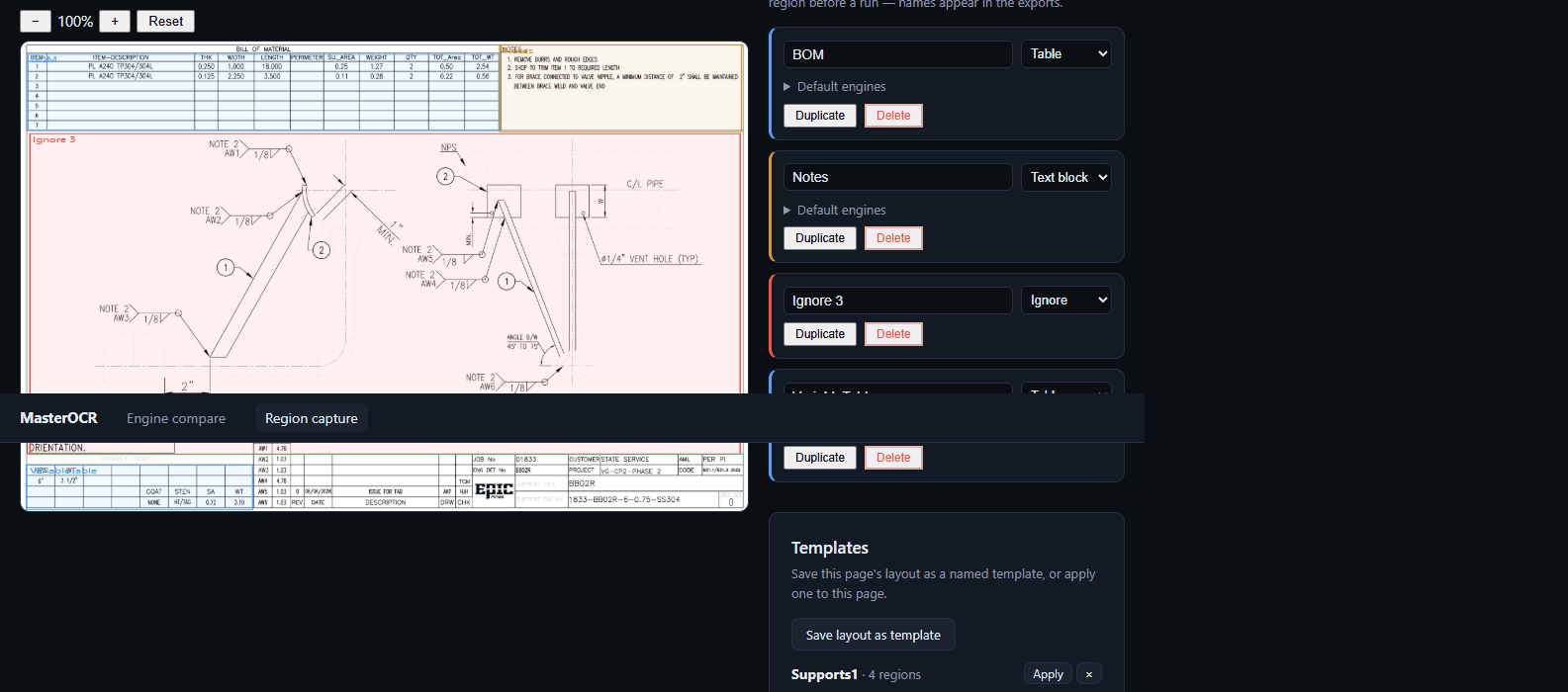
The engine-compare page answers which engine is best. The region-capture page answers a different question: get this specific table out of this drawing, with the blanks in the right places.
| Kind | What it does |
|---|---|
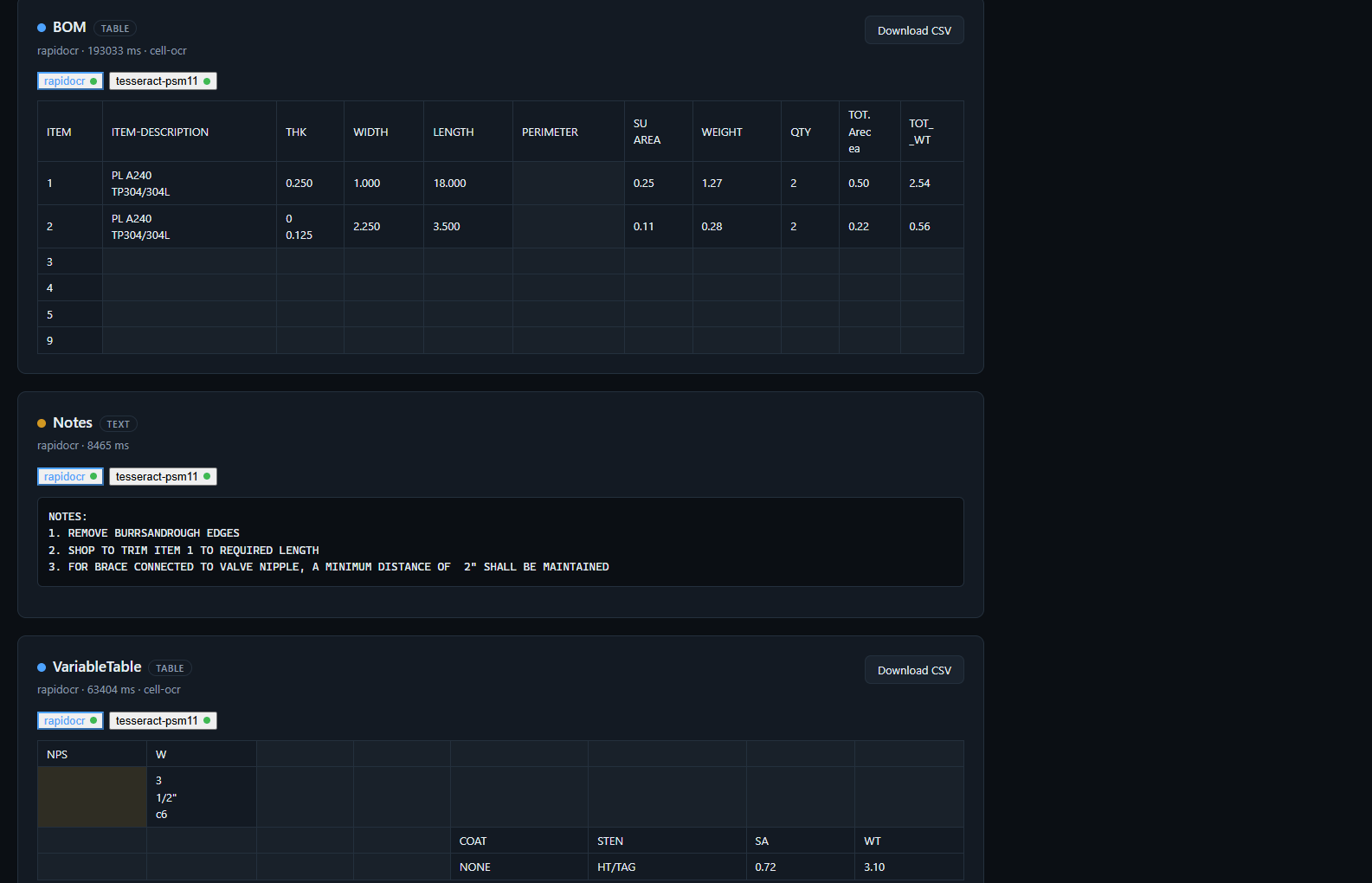
| Table | Detects the grid inside the rectangle (ruling lines, or whitespace gutters as a fallback), OCRs each cell, and renders a true table — blank cells stay blank and columns stay aligned |
| Single line | One OCR pass over the rectangle — for dimension callouts, titles, part numbers |
| Text block | Paragraph OCR over the rectangle |
| Key-value | Same as text block, but flagged for structured extraction |
| Ignore | Excluded from all output — title blocks, stamps, geometry |
Then run it. Every selected engine runs per region, and table regions render as real tables with per-cell confidence. A cell with no text above the confidence floor renders blank; text below the floor is shown but tinted amber.
Two table pipelines feed one output: cell-by-cell OCR for raster engines, and whole-region table engines (Camelot, img2table) clipped to the region — both normalize to the same rows × columns matrix. Templates save a page's layout and apply it to any page of any document.
The metrics
| Metric | What it tells you |
|---|---|
| CER / WER | Character and word error rate against the reference |
| Reference | Text layer for born-digital pages; consensus medoid for raster/vector |
| Missed callouts | Dimension symbols (Ø, R, ±, mm, NPS, SCH) the engine failed to read |
| Invented callouts | Callouts the engine produced that are not in the reference |
| Repetition ratio | Fraction of repeated 5-grams — catches decode loops |
| Prose ratio | Share of long digit-free lines — a drawing has almost none, so this is a strong VLM hallucination signal |
| Length z-score | Robust (MAD) outlier test on output length |
| Garbage ratio | Share of characters outside printable Latin ranges |
| Table match | Row and cell deltas versus the reference |
The engine roster
| Tier | Count | Runs on Railway | Notes |
|---|---|---|---|
| 1 — Core CPU | 15 | Yes, default image | Text-layer extractors, Tesseract variants, RapidOCR, table tools |
| 2 — Heavy CPU | 16 | Only with INSTALL_HEAVY=true | torch/paddle engines incl. Docling and Unstructured; ~4 GB extra image, 5–15 s/page |
| 3 — Free API | 9 | Yes, with a key | OCR.space, Google Vision, Azure DI, Gemini, Mistral, LlamaParse |
| 4 — Paid API | 10 | Yes, with a key | Textract, Mathpix, Datalab, DeepInfra, OpenAI, Claude, Reducto |
| 5 — GPU only | 10 | No | Documented stubs; see the GPU engines doc |
This is the constraint that shapes the whole design. GPU-only models (olmOCR, Chandra, DeepSeek-OCR, Qwen3-VL, and more) are registered as Tier 5 with requires_gpu=True, which makes them visible in the UI with an explanation but never executable.
Best performer so far
RapidOCR (rapidocr, PP-OCRv4 on ONNX Runtime) is the strongest engine on the sample corpus. It needs no API key, no GPU, and no torch — just ONNX Runtime — and it is the only engine that reliably recovers text from CAD plots where the labels were converted to vector outlines.
Its cost is latency: the ONNX models are loaded per subprocess invocation, so a single page takes roughly 30–50 s on a Railway CPU container. The registry gives it a 600 s timeout to leave headroom for multi-page documents.
How the backend works
Each engine runs in its own subprocess with a hard timeout, so one bad engine cannot take down the request. PaddleOCR can segfault, Docling can exhaust memory, and a cloud adapter can hang on a socket — a crash becomes a row in the results table, not a 500.
FastAPI serves the built React bundle from the same origin, so there is no CORS configuration and no second Railway service to pay for.
The region pipeline
- Crop — each region is clipped from the 300 DPI page image (PyMuPDF).
- Grid detection — for table regions, numpy finds ruling lines (or falls back to whitespace gutters), then drops empty margin bands so the grid hugs the ink.
- Cell OCR — raster engines OCR each cell individually (single-line PSM).
- Normalize — both pipelines emit the same rows × columns matrix.
Status
MasterOCR is a working FastAPI + React service that deploys to Railway in one command. Every credential is optional — an engine without its key simply reports as unavailable rather than failing the run. A volume mounted at /data keeps results across redeploys.
The heavy tier is deliberately absent from the default image: Docling and Unstructured pull torch (and the CUDA wheels that come with it) as a transitive dependency, which is far too large to ship by default. Three engines are excluded entirely because their pins cannot coexist with the core set — their adapters stay registered and report as unavailable rather than breaking the build.