Keyecend
Your command center for desktop automation — a scriptable macro engine with vision-based logic, human-like mouse movement, and dynamic coordinates.
What it is
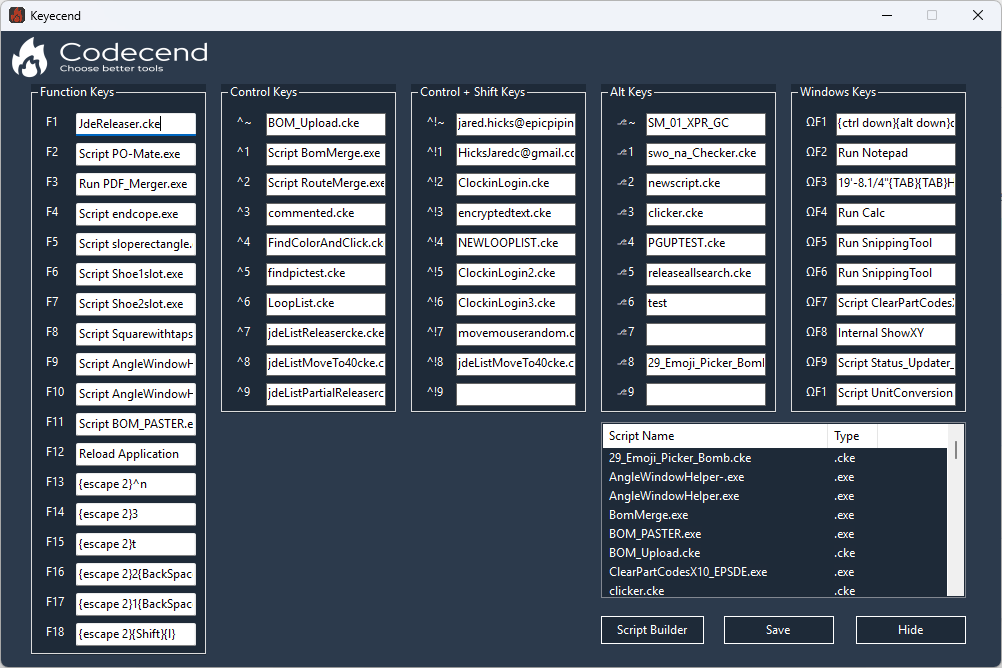
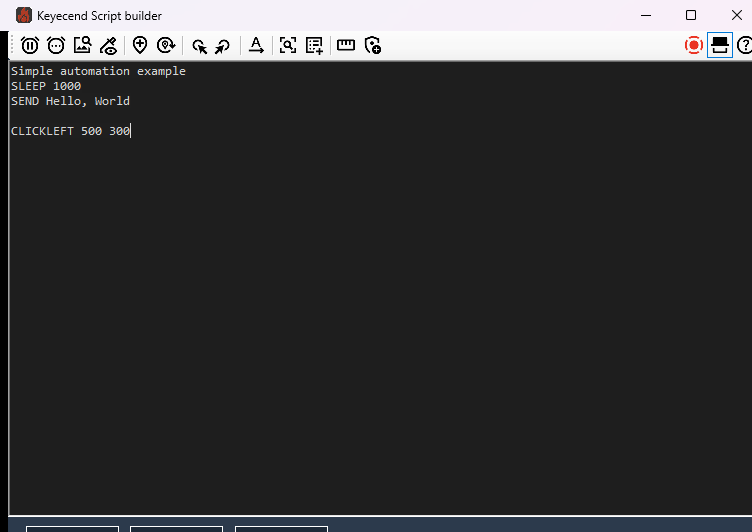
Keyecend turns repetitive tasks into automated workflows. It's a macro engine with its own scripting language — but the language is designed around what automation actually needs: reacting to what's on screen, moving the mouse like a person, and handling the fiddly details of typing text into other applications.
It started as a personal tool and became my flagship desktop product. It ships digitally signed, and it only does what you explicitly script.
Where it came from — KeyChain
Keyecend didn't start as a product. It started as KeyChain, an AutoHotkey tool I wrote in 2022 to stop repeating the same handful of actions a hundred times a day.
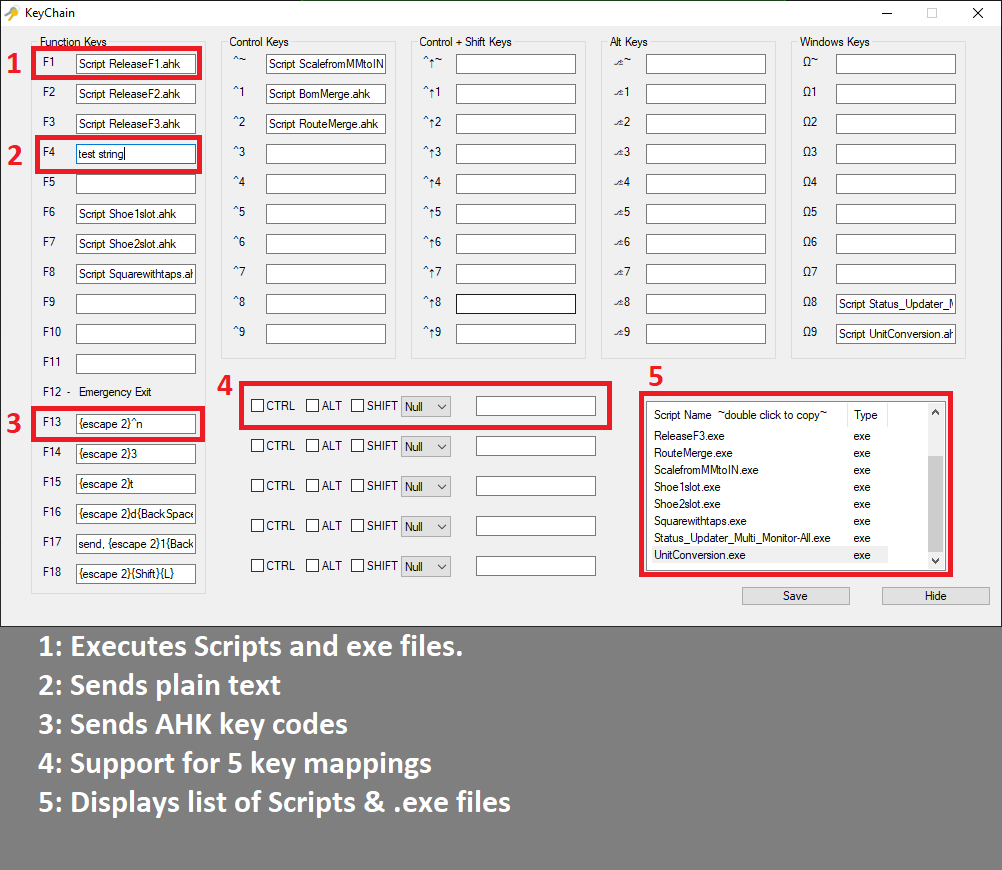
KeyChain was a single place to bind actions to keys: send plain text, send AutoHotkey key mappings, run a script or an executable, launch an application, Google whatever text was highlighted, or click at a coordinate. It kept a script repository in the bottom-right of the window so anything in it could be bound to a hotkey and launched by name — the tool grew with you instead of needing to be reconfigured.
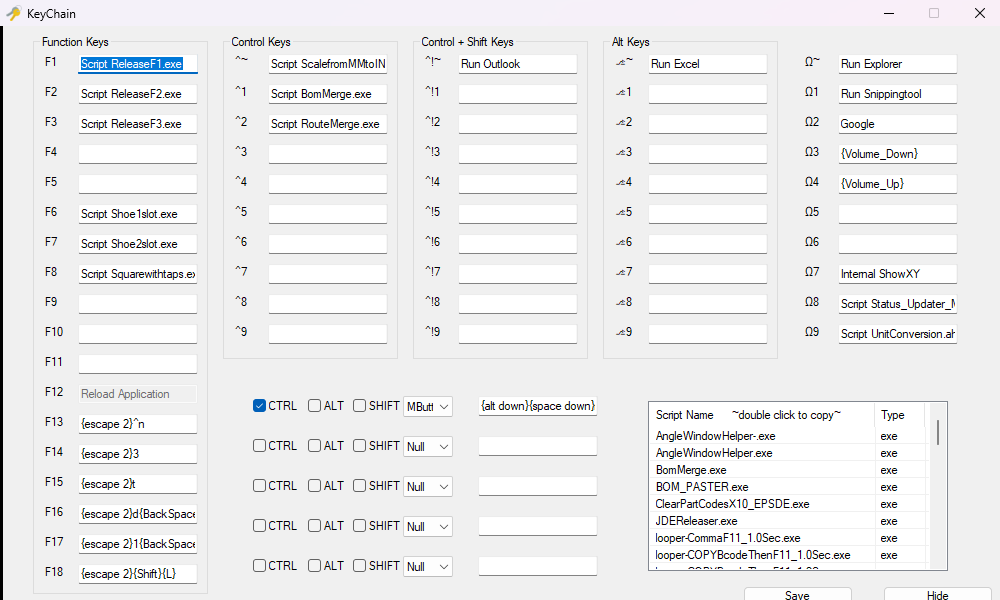
Two details from KeyChain survived into Keyecend almost unchanged. The first is ShowXY — a built-in command that displays live mouse coordinates, because a tool that clicks at coordinates has to ship the way to find those coordinates. The second is discoverability: KeyChain bound Ctrl+Esc to a list of every active hotkey and what it was assigned to. Once you've bound twenty things to twenty key combinations, being able to ask the tool what they all are matters more than you'd expect.
| KeyChain (2022) | Keyecend | |
|---|---|---|
| Binding | One action per hotkey | Full script per hotkey |
| Logic | None — fire and forget | Loops, lists, waits, retries |
| Screen awareness | Fixed coordinates | Image and color detection, relative coordinates |
| Authoring | Edit an AutoHotkey script | Script builder plus a purpose-built language |
| Distribution | Personal tool | Signed, versioned, MIT-licensed product |
KeyChain is the ancestor of Keyecend — the same instinct, aimed at a power user who wants to wire up their own keys rather than write a full automation script. Keyecend is where that became a real product with a real language. The KeyChain source is still on GitHub for anyone who wants the origin story in code.
Vision-based logic
The feature that separates Keyecend from a simple macro recorder is that scripts can see the screen:
- WAITFORIMAGEFILE — wait for an image to appear, with a timeout, an action offset, and a retry limit. That makes loops possible: wait for the login button, and if it never appears, jump back and try again.
- WAITFORCOLOR — wait for a specific pixel to turn a specific color, with a timeout.
- FINDCOLORCLICK — find the first pixel matching a color and click it.
Scripts that wait for things are fundamentally more robust than scripts that just sleep for a fixed number of milliseconds and hope.
Dynamic coordinates
This is the most important design decision in the whole engine. Coordinates can be written relative to a found image instead of as fixed pixels:
| Coordinate | Meaning |
|---|---|
| foundimage.center | Center of the found image |
| foundimage.topleft | Top-left corner |
| foundimage.bottomright | Bottom-right corner |
| foundimage.offsetx [px] | Center plus a horizontal offset |
| foundimage.offsety [px] | Center plus a vertical offset |
| foundimage.offsetxy [x] [y] | Center plus both offsets |
A script written this way keeps working when a window moves, when a resolution changes, or when a layout shifts. A script full of hardcoded pixels breaks the moment anything moves — and that's the difference between automation you trust and automation you babysit.
# Wait for the username field, then click 200px right of its center
          WAITFORIMAGEFILE username_field.jpg,0,-1,0
          CLICKLEFT foundimage.offsetx 200
          SEND MyUsername{TAB}
          SEND MyPassword{ENTER}
Human-like movement
MOVEMOUSEHUMAN moves the cursor along a Bezier curve over a specified duration instead of teleporting to a coordinate. Combined with SLEEPRANDOM, which pauses for a random duration within a range, scripts behave like a person at a keyboard rather than a robot snapping between points.
The scripting language
Flow control
- SLEEP [ms] — fixed pause.
- SLEEPRANDOM [min] [max] — randomized pause.
- LOOP [count|unlimited] … ENDLOOP — repeat a command block.
- LOOPLIST [name] … ENDLOOP — iterate a user-defined list.
- # comment — ignored during execution.
Mouse, keyboard, and text
- MOVEMOUSE [x] [y] — instant positioning, including against dynamic coordinates.
- CLICKLEFT / CLICKRIGHT [x] [y] — clicks with dynamic-coordinate support.
- SEND [text] — full AutoHotkey syntax: special keys like {ENTER}, {TAB}, {F5}, and {UP 2}; modifiers like ^c for Ctrl+C, +a for Shift+A, and %{F4} for Alt+F4.
- SENDLISTITER [name] — type the current item from a list.
System and utilities
- RUN [path] — launch external programs and scripts.
- ENCRYPT — a UI tool: select text, click Encrypt, and get an encrypted string back.
- MEASURE — an interactive distance-measurement tool that reports both points and the delta between them.
Scripts often need to type passwords. SEND Enc("…") sends encrypted text, so credentials never appear in plaintext in a script file. Paired with the built-in ENCRYPT tool, that's a complete workflow for keeping secrets out of scripts.
Global controls
Running scripts are always in your control, from any application:
- Pause/Break — pause or resume the current script.
- End — stop it immediately.
A global stop key is not optional in an automation tool. Automation that can't be interrupted is automation nobody trusts.
Use cases
- Gaming — resource gathering and repetitive actions.
- Data entry — form filling and batch processing.
- Testing — UI automation and regression checks.
- Productivity — file organization and system maintenance.
- Development — build and deployment scripting.
Requirements
Windows 10 or later, .NET Framework 4.7.2+, and about 50 MB of disk. User-level access is enough for most automation; system-wide automation needs administrator rights. Multi-monitor setups are fully supported with complete coordinate mapping.